Settings file
Default settings code
  1function [stg] = default_settings()
  2% This function returns a structure "stg" containing default settings for a
  3% model analysis and optimization workflow. The structure includes settings
  4% related to model import, analysis, simulation, diagnostics, plotting,
  5% sensitivity analysis, and optimization. Inputs and outputs for the
  6% function are as follows:
  7%
  8%   Inputs: None
  9%
 10%   Outputs:
 11%     - stg: A structure containing fields for various settings, which
 12%            include import options, analysis options, simulation options,
 13%            diagnostics settings, plotting options, sensitivity analysis
 14%            options, and optimization settings.
 15%
 16%   Functions called: None
 17%
 18%   Loaded variables: None
 19%
 20% To understand the function better, please read the comments within the
 21% code for a detailed explanation of each setting and their default values.
 22
 23% stg.exprun: Lists experiments to run (example experiment 1 to 3 and
 24% experiment 6)
 25%
 26% stg.useLog: Determines the scoring method choice (check documentation)
 27% (Use logarithm)
 28%
 29% stg.optmc: Specifies whether to use multi-core wherever available
 30% (Optimization Multi-core)
 31%
 32% stg.rseed: Sets the random seed value (Random seed)
 33%
 34% stg.simcsl: Indicates whether to display simulation diagnostics in the
 35% console (Simulation Console)
 36%
 37% stg.optcsl: Specifies whether to display optimization results in the
 38% console (Optimization console)
 39%
 40% stg.save_results: Specifies whether to save results (Save results)
 41%
 42% stg.simdetail: Specifies whether to run detailed simulation for plots
 43%
 44% stg.maxt: Sets the maximum time for each individual function to run in
 45% seconds (Maximum time)
 46%
 47% stg.eqt: Defines the equilibration time (Equilibration time)
 48%
 49% stg.dimenanal: Specifies whether to perform Dimensional Analysis
 50% (Dimensional Analysis)
 51%
 52% stg.UnitConversion: Specifies whether to perform Unit conversion (Unit
 53% conversion)
 54%
 55% stg.abstolscale: Specifies whether to apply Absolute Tolerance Scaling
 56% (Absolute Tolerance Scaling)
 57%
 58% stg.reltol: Assigns the value of Relative tolerance (Relative tolerance)
 59%
 60% stg.abstol: Assigns the value of Absolute tolerance (Absolute tolerance)
 61%
 62% stg.simtime: Specifies the time units for simulation (Simulation time)
 63%
 64% stg.sbioacc: Specifies whether to run sbioaccelerate (sbioaccelerate)
 65%
 66% stg.abstolstepsize_eq: Provides the absolute tolerance step size for
 67% equilibration (Absolute tolerance step size for equilibration)
 68%
 69% stg.maxstep: Max step size in the simulation (if empty, MATLAB decides
 70% what's best) (Maximum step)
 71%
 72% stg.maxstepeq: Sets the max step size in the simulation (if empty, MATLAB
 73% decides what's best) (Maximum step)
 74%
 75% stg.maxstepdetail: Sets the max step size in the detailed plots (if
 76% empty, MATLAB decides what's best) (Maximum step)
 77%
 78% stg.errorscore: Specifies the default score when there is a simulation
 79% error, required to keep optimizations working (error score)
 80%
 81% stg.parnum: Specifies the number of parameters to optimize (Parameter
 82% number)
 83%
 84% stg.lb: Assigns the array with the lower bound of all parameters (Lower
 85% bound)
 86%
 87% stg.ub: Assigns the array with the upper bound of all parameters (Upper
 88% bound)
 89%
 90% stg.partest: Choice of what parameters in the array to test, the indices
 91% correspond to the parameters in the model and the numbers correspond to
 92% the parameters in the optimization array (Parameters to test)
 93%
 94% stg.pat: Defines the parameter array to test (Parameter array to test)
 95%
 96% stg.pa: Contains all the parameter arrays (parameters here are in log10
 97% space) (Parameter arrays)
 98%
 99% stg.bestpa: Provides the best parameter array found so far for the model
100% (Best parameter array)
101%
102% stg.plot: Specifies whether to plot results (Plots)
103%
104% stg.plotoln: Specifies whether to use long names in the title
105%
106% stg.sansamples: Sets the number of samples to use in Sensitivity Analysis
107% (Sensitivity analysis number of samples)
108%
109% stg.sasubmean: Specifies whether to subtract the mean before calculating
110% SI and SIT in Sensitivity Analysis (Sensitivity analysis subtract mean)
111%
112% stg.sasamplemode: Determines the sampling mode for Sensitivity Analysis
113% (Sensitivity analysis sampling mode)
114%
115% stg.sasamplesigma: Defines the sigma for creating the normal distribution
116% of parameters to perform Sensitivity Analysis (Sensitivity analysis
117% sampling sigma)
118%
119% stg.optt: Sets the time for the optimization in seconds (Optimization
120% time)
121%
122% stg.popsize: Defines the population size for the algorithms that use
123% populations (Population size)
124%
125% stg.osm: Chooses the optimization start method (Optimization start
126% method)
127%
128% stg.dbs: Specifies the distance from the best parameter array to be used
129% in stg.osm method 2 (Distance from best parameter array)
130%
131% stg.mst: Specifies whether to use Multistart (Multistart)
132%
133% stg.msts: Provides the Multistart size
134%
135% stg.optplots: Specifies whether to display Plots (Plots don't work if
136% using multistart) (Optimization plots)
137%
138% stg.fmincon: Indicates whether to run fmincon (fmincon)
139%
140% stg.fm_options: Sets options for fmincon (fmincon options)
141%
142% stg.sa: Specifies whether to run simulated annealing (Simulated
143% annealing)
144%
145% stg.sa_options: Provides options for simulated annealing (Simulated
146% annealing options)
147%
148% stg.psearch: Specifies whether to run Pattern search (Pattern search)
149%
150% stg.psearch_options: Sets options for Pattern search (Pattern search
151% options)
152%
153% stg.ga: Specifies whether to run Genetic algorithm (Genetic algorithm)
154%
155% stg.ga_options: Options for Genetic algorithm (Genetic algorithm options)
156%
157% stg.pswarm: Specifies whether to run Particle swarm (Particle swarm)
158%
159% stg.pswarm_options: Sets options for Particle swarm (Particle swarm
160% options)
161%
162% stg.sopt: Specifies whether to run Surrogate optimization (Surrogate
163% optimization)
164%
165% stg.sopt_options: Provides options for Surrogate optimization (Surrogate
166% optimization options)
167
168%% Analysis
169
170% Lists experiments to run (example experiment 1 to 3 and experiment 6)
171stg.exprun = [1:3,6];
172
173% Determines the scoring method choice (check documentation) (Use
174% logarithm)
175stg.useLog = 4;
176
177% Specifies whether to use multicore wherever available (Optimization
178% Multicore)
179stg.optmc = true;
180
181% Sets the random seed value (Random seed)
182stg.rseed = 1;
183
184% Indicates whether to display simulation diagnostics in the console
185% (Simulation Console)
186stg.simcsl = false;
187
188% Specifies whether to display optimization results in the console
189% (Optimization console)
190stg.optcsl = false;
191
192% Specifies whether to save results (Save results)
193stg.save_results = true;
194
195% Specifies whether to run detailed simulation for plots
196stg.simdetail = true;
197
198%% Simulation
199
200% Sets the maximum time for each individual function to run in seconds
201% (Maximum time)
202stg.maxt = 10;
203
204% Defines the equilibration time (Equilibration time)
205stg.eqt  = 50000;
206
207% Specifies whether to perform Dimensional Analysis (Dimensional Analysis)
208stg.dimenanal = false;
209
210% Specifies whether to perform Unit conversion (Unit conversion)
211stg.UnitConversion = false;
212
213% Specifies whether to apply Absolute Tolerance Scaling (Absolute Tolerance
214% Scaling)
215stg.abstolscale = true;
216
217% Assigns the value of Relative tolerance (Relative tolerance)
218stg.reltol = 1.0E-3;
219
220% Value of Relative tolerance minimum
221% (Relative tolerance minimum)
222stg.reltol_min = 1.0E-3;
223
224% Value of Absolute tolerance
225% (Absolute tolerance)
226stg.abstol = 1.0E-6;
227
228% Value of Absolute tolerance minimum
229% (Absolute tolerance minimum)
230stg.abstol_min = 1.0E-6;
231
232% Specifies the time units for simulation (Simulation time)
233stg.simtime = "second";
234
235% Specifies whether to run sbioaccelerate (after changing this value you
236% need to run "clear functions" to see an effect) (sbioaccelerate)
237stg.sbioacc = true;
238
239% Provides the absolute tolerance step size for equilibration (Absolute
240% tolerance step size for equilibration)
241stg.abstolstepsize_eq = [];
242
243% Max step size in the simulation (if empty MATLAB decides whats best)
244% (Maximum step)
245stg.maxstep = 10;
246
247% Sets the max step size in the simulation (if empty, MATLAB decides what's
248% best) (Maximum step)
249stg.maxstepeq = 2;
250
251% Sets the max step size in the detailed plots (if empty, MATLAB decides
252% what's best) (Maximum step)
253stg.maxstepdetail = 2;
254
255% Specifies the default score when there is a simulation error, required to
256% keep optimizations working (error score)
257stg.errorscore = 10^10;
258%% Model
259
260% Specifies the number of parameters to optimize (Parameter number)
261stg.parnum = 5;
262
263% Provides the array with the lower bound of all parameters
264original_parameter_set = zeros(1,10);
265
266% Assigns the array with the lower bound of all parameters  (Lower bound)
267stg.lb = original_parameter_set-5;
268
269% Assigns the array with the upper bound of all parameters (Upper bound)
270stg.ub = original_parameter_set+5;
271
272%% Diagnostics
273
274% Choice of what parameters in the array to test, the indices correspond to
275% the parameters in the model and the numbers correspond to the parameters
276% in the optimization array, usually not all parameters are optimized so
277% there needs to be a match between one and the other. (Parameters to test)
278% In this example there are ten parameters in this imaginary model and we
279% are only interested in parameter 2,4,8,9, and 10. Note that stg.parnum is
280% five because of this and not ten
281stg.partest(:,1) = [0,1,0,2,0,0,0,3,4,5];
282
283% Defines the parameter array to test (Parameter array to test)
284stg.pat = 1:2;
285
286% Contains all the parameter arrays (parameters here are in log10 space)
287% (Parameter arrays)
288stg.pa(1,:) = [1,1,1,1,1];
289stg.pa(1,:) = [1,0,1,2,1];
290
291% Provides the best parameter array found so far for the model (Best
292% parameter array)
293stg.bestpa = stg.pa(1,:);
294
295%% Plots
296
297stg.lsa_samples = 1000;
298stg.lsa_range_from_best = 0.25;
299
300% Specifies whether to plot results (Plots)
301stg.plot = true;
302
303% Specifies whether to use long names in the title of the output plots in
304% f_plot_outputs.m (Plot outputs long names)
305stg.plotoln = true;
306
307
308stg.in_plot_trim = 1;
309
310%% Sensitivity analysis
311
312% Sets the number of samples to use in Sensitivity Analysis (Sensitivity
313% analysis number of samples)
314stg.sansamples = 100;
315
316% Specifies whether to subtract the mean before calculating SI and SIT in
317% Sensitivity Analysis (Sensitivity analysis subtract mean)
318stg.sasubmean = true;
319
320% Determines the sampling mode for Sensitivity Analysis; 0 Log uniform
321% distribution truncated at the parameter bounds 1 Log normal distribution
322% with mu as the best value for a parameter and sigma as stg.sasamplesigma
323% truncated at the parameter bounds 2 same as 1 without truncation 3 Log
324% normal distribution centered at the mean of the parameter bounds and
325% sigma as stg.sasamplesigma truncated at the parameter bounds 4 same as 3
326% without truncation. (Sensitivity analysis sampling mode)
327stg.sasamplemode = 2;
328
329% Defines the sigma for creating the normal distribution of parameters to
330% perform Sensitivity Analysis (Sensitivity analysis sampling sigma)
331stg.sasamplesigma = 0.1;
332
333
334stg.gsabootstrapsize = ceil(sqrt(stg.sansamples));
335
336%% Profile Likelihood
337
338% Parameter(optimization array) that is being worked on in a specific
339% iteration of PL (if -1 no parameter is being worked in PL)
340% (Profile Likelihood Index)
341stg.PLind = -1;
342
343% Which parameters to do PL on, it should be all parameters but can also be
344% a subset for testing purposes
345% (Profile Likelihood parameters to Test)
346stg.pltest = [1:6];
347
348% How many points to do for each parameter in the PL
349% (Profile Likelihood Resolution)
350stg.plres = 50;
351
352% True or false to decide whether to do plots after calculating PL
353% (Profile Likelihood Plots)
354stg.plplot = true;
355
356% (Profile likelihood simulated annealing opptimization to start)
357stg.plsaots = optimoptions(@simulannealbnd,'Display','off', ...
358    'InitialTemperature',...
359    ones(1,stg.parnum-1)*1,'MaxTime',15,'ReannealInterval',40);
360
361% (Profile Likelihood optimization threshold value)
362stg.plotv = 0.99;
363
364% Ratio between the value of the first try of a point in PLA and the
365% previous point,if above this ratio an intermediate value is picked up to
366% 2 times
367stg.ratio = 2;
368
369% Profile Likelihood re-optimize optimization number
370stg.plroptn = 30;
371
372% Profile Likelihood display current optimization status
373stg.pldcos = 0;
374
375% True or false to decide whether to run simulated annealing
376% (Profile Likelihood Simulated Annealing)
377stg.plsa = true;
378
379% Options for simulated annealing
380% (Profile Likelihood Simulated Annealing options)
381stg.plsao = optimoptions(@simulannealbnd,'Display','off', ...
382    'InitialTemperature',...
383    ones(1,stg.parnum-1)*1,'MaxTime',10,'ReannealInterval',40);
384
385% (Profile Likelihood Simulated Annealing options start)
386stg.plsaos = optimoptions(@simulannealbnd,'Display','off', ...
387        'InitialTemperature',...
388        ones(1,stg.parnum-1)*1,'MaxTime',60,'ReannealInterval',40);
389
390% True or false to decide whether to run Pattern search
391% (Profile Likelihood Pattern search)
392stg.plps = true;
393
394% Options for Pattern search
395% (Pattern search options)
396stg.plpso = optimoptions(@patternsearch,'Display','off',...
397    'MaxTime',9,...
398    'UseCompletePoll',false,'UseCompleteSearch',false,...
399    'MaxMeshSize',1,'MaxFunctionEvaluations',10000);
400
401stg.plpsos = optimoptions(@patternsearch,'Display','off',...
402    'MaxTime',60,...
403    'UseCompletePoll',false,'UseCompleteSearch',false,...
404    'MaxMeshSize',1,'MaxFunctionEvaluations',10000);
405
406% True or false to decide whether to run surrogate optimization
407% (Profile Likelihood surrogate optimization)
408stg.plfm = true;
409
410% Options for surrogate optimization
411% (Profile Likelihood surrogate optimization options)
412stg.plfmo = optimoptions(@simulannealbnd,'Display','off', ...
413    'InitialTemperature',...
414    ones(1,stg.parnum-1)*1,'MaxTime',10,'ReannealInterval',40);
415
416% (Profile Likelihood surrogate optimization options start)
417stg.plfmos = optimoptions(@simulannealbnd,'Display','off', ...
418        'InitialTemperature',...
419        ones(1,stg.parnum-1)*1,'MaxTime',60,'ReannealInterval',40);
420
421%% Optimization
422
423% Sets the time for the optimization in seconds (fmincon does not respect
424% this time!!) (Optimization time)
425stg.optt = 60*5;
426
427% Defines the population size for the algorithms that use populations
428% (Population size)
429stg.popsize = 144;
430
431% Chooses the optimization start method: 1 for random starting point(s)
432% inside bounds, 2 for random starting point(s) near the best point
433% (Optimization start method)
434stg.osm = 1;
435
436% Specifies the distance from the best parameter array to be used in
437% stg.osm method 2 (Distance from best parameter array)
438stg.dbpa = 0.1;
439
440% Specifies whether to use Multistart (Multistart)
441stg.mst = false;
442
443% Provides the Multistart size
444stg.msts = 1;
445
446% Specifies whether to display Plots (Plots don't work if using multistart)
447% (Optimization plots)
448stg.optplots = true;
449
450% Indicates whether to run fmincon (no gradient, so this doesn't work well;
451% no max time!!) (fmincon)
452stg.fmincon = false;
453
454% Sets options for fmincon (fmincon options)
455stg.fm_options = optimoptions('fmincon', 'Algorithm', 'interior-point',...
456    'MaxIterations', 10, 'OptimalityTolerance', 0, 'StepTolerance', 1e-6,...
457    'FiniteDifferenceType', 'central', 'MaxFunctionEvaluations', 10000);
458
459% Specifies whether to run simulated annealing (Simulated annealing)
460stg.sa = false;
461
462% Provides options for simulated annealing (Simulated annealing options)
463stg.sa_options = optimoptions(@simulannealbnd, 'MaxTime', stg.optt,...
464    'ReannealInterval', 40);
465
466% Specifies whether to run Pattern search (Pattern search)
467stg.psearch = false;
468
469% Sets options for Pattern search (Pattern search options)
470stg.psearch_options = optimoptions(@patternsearch, 'MaxTime', stg.optt,...
471    'UseParallel', stg.optmc, 'UseCompletePoll', true,...
472    'UseCompleteSearch', true, 'MaxMeshSize',2, ...
473    'MaxFunctionEvaluations', 2000);
474
475% Specifies whether to run Genetic algorithm (Genetic algorithm)
476stg.ga = false;
477
478% Options for Genetic algorithm (Genetic algorithm options)
479stg.ga_options = optimoptions(@ga, 'MaxGenerations', 200, ...
480    'MaxTime', stg.optt,'UseParallel', stg.optmc, ...
481    'PopulationSize', stg.popsize,'MutationFcn', 'mutationadaptfeasible', ...
482    'HybridFcn',{@patternsearch,stg.psearch_options});
483
484% Specifies whether to run Particle swarm (Particle swarm)
485stg.pswarm = false;
486
487% Sets options for Particle swarm (Particle swarm options)
488stg.pswarm_options = optimoptions('particleswarm', 'MaxTime', stg.optt,...
489    'UseParallel', stg.optmc, 'MaxIterations', 200, ...
490    'SwarmSize', stg.popsize);
491
492% Specifies whether to run Surrogate optimization (Surrogate optimization)
493stg.sopt = false;
494
495% Provides options for Surrogate optimization (Surrogate optimization
496% options)
497stg.sopt_options = optimoptions('surrogateopt', 'MaxTime', stg.optt,...
498    'UseVectorized', stg.optmc, 'MaxFunctionEvaluations', 5000,...
499    'MinSampleDistance', 0.2, 'MinSurrogatePoints', 32*2+1);
500end
Example settings code
Import
Default settings code
Example settings code
stg.import - (logical) Decide whether to run import functions
stg.sbtab_excel_name - (string) Name of the Excel file with the SBtab
stg.name - (string) Name of the model
stg.cname - (string) Name of the default model compartment
stg.sbtab_name - (string) Name of the SBtab saved in .mat format
Analysis
Default settings code
 1% Lists experiments to run (example experiment 1 to 3 and experiment 6)
 2stg.exprun = [1:3,6];
 3
 4% Determines the scoring method choice (check documentation) (Use
 5% logarithm)
 6stg.useLog = 4;
 7
 8% Specifies whether to use multicore wherever available (Optimization
 9% Multicore)
10stg.optmc = true;
11
12% Sets the random seed value (Random seed)
13stg.rseed = 1;
14
15% Indicates whether to display simulation diagnostics in the console
16% (Simulation Console)
17stg.simcsl = false;
18
19% Specifies whether to display optimization results in the console
20% (Optimization console)
21stg.optcsl = false;
22
23% Specifies whether to save results (Save results)
24stg.save_results = true;
25
26% Specifies whether to run detailed simulation for plots
27stg.simdetail = true;
Example settings code
stg.exprun - (double) Experiments to run
stg.useLog - (double) Choice between 0,1,2 and 3 to change either and how to apply log10 to the scores, check results:
stg.optmc - (logical) Decide whether to use multicore everywhere it is available
stg.rseed - (double) Choice of random seed
stg.simcsl - (logical) Decide whether to display simulation diagnostics in the console
stg.optcsl - (logical) Decide whether to display optimization results on console
stg.save_results - (logical) Decide whether to save results
stg.simdetail - (logical) Decide whether to run detailed simulation for plots
Simulation
Default settings code
 1% Sets the maximum time for each individual function to run in seconds
 2% (Maximum time)
 3stg.maxt = 10;
 4
 5% Defines the equilibration time (Equilibration time)
 6stg.eqt  = 50000;
 7
 8% Specifies whether to perform Dimensional Analysis (Dimensional Analysis)
 9stg.dimenanal = false;
10
11% Specifies whether to perform Unit conversion (Unit conversion)
12stg.UnitConversion = false;
13
14% Specifies whether to apply Absolute Tolerance Scaling (Absolute Tolerance
15% Scaling)
16stg.abstolscale = true;
17
18% Assigns the value of Relative tolerance (Relative tolerance)
19stg.reltol = 1.0E-3;
20
21% Value of Relative tolerance minimum
22% (Relative tolerance minimum)
23stg.reltol_min = 1.0E-3;
24
25% Value of Absolute tolerance
26% (Absolute tolerance)
27stg.abstol = 1.0E-6;
28
29% Value of Absolute tolerance minimum
30% (Absolute tolerance minimum)
31stg.abstol_min = 1.0E-6;
32
33% Specifies the time units for simulation (Simulation time)
34stg.simtime = "second";
35
36% Specifies whether to run sbioaccelerate (after changing this value you
37% need to run "clear functions" to see an effect) (sbioaccelerate)
38stg.sbioacc = true;
39
40% Provides the absolute tolerance step size for equilibration (Absolute
41% tolerance step size for equilibration)
42stg.abstolstepsize_eq = [];
43
44% Max step size in the simulation (if empty MATLAB decides whats best)
45% (Maximum step)
46stg.maxstep = 10;
47
48% Sets the max step size in the simulation (if empty, MATLAB decides what's
49% best) (Maximum step)
50stg.maxstepeq = 2;
51
52% Sets the max step size in the detailed plots (if empty, MATLAB decides
53% what's best) (Maximum step)
54stg.maxstepdetail = 2;
55
56% Specifies the default score when there is a simulation error, required to
57% keep optimizations working (error score)
58stg.errorscore = 10^10;
Example settings code
stg.maxt - (double) Maximum time for each individual function has to run in seconds
stg.eqt - (double) Equilibration time in seconds
stg.dimenanal - (logical) Decide whether to do Dimensional Analysis
stg.UnitConversion - (logical) Decide whether to do Unit conversion
stg.abstolscale - (logical) Decide whether to do Absolute Tolerance Scaling
stg.reltol - (double) Value of Relative tolerance
stg.abstol - (double) Value of Absolute tolerance
stg.simtime - (string) Time units for simulation
stg.sbioacc - (logical) Decide whether to run sbioaccelerate (after changing this value you need to run “clear functions” to see an effect)
stg.abstolstepsize_eq - (double) Absolute tolerance step size for equilibration (if empty MATLAB® decides whats best)
stg.maxstep - (double) Max step size in the simulation (if empty MATLAB® decides what’s best)
stg.maxstepeq - (double) Max step size in the equilibration (if empty MATLAB® decides whats best)
stg.maxstepdetail - (double) Max step size in the detailed plots (if empty MATLAB® decides whats best)
stg.errorscore - (double) Default score when there is a simulation error, this is needed to keep the optimizations working.
Model
Default settings code
 1% Specifies the number of parameters to optimize (Parameter number)
 2stg.parnum = 5;
 3
 4% Provides the array with the lower bound of all parameters
 5original_parameter_set = zeros(1,10);
 6
 7% Assigns the array with the lower bound of all parameters  (Lower bound)
 8stg.lb = original_parameter_set-5;
 9
10% Assigns the array with the upper bound of all parameters (Upper bound)
11stg.ub = original_parameter_set+5;
Example settings code
stg.parnum - (double) Number of parameters to optimize
stg.tci - (double) Index for the parameters that have thermodynamic constraints
stg.tcm - (double) Parameters to multiply to the first parameter (in stg.partest to get to the correct thermodynamic constraint formula)
stg.tcd - (double) Parameters to divide to the first parameter (in stg.partest to get to the correct thermodynamic constraint formula)
stg.lb - (double) Lower bound of all parameters
\[stg.lb = \begin{bmatrix} lb_{1} & lb_{2} & ... & lb_{i} \end{bmatrix}\]\(i =\) Parameter index
stg.ub - (double) Upper bound of all parameters
\[stg.up = \begin{bmatrix} ub_{1} & ub_{2} & ... & ub_{i} \end{bmatrix}\]\(i =\) Parameter index
Diagnostics
Default settings code
 1% Choice of what parameters in the array to test, the indices correspond to
 2% the parameters in the model and the numbers correspond to the parameters
 3% in the optimization array, usually not all parameters are optimized so
 4% there needs to be a match between one and the other. (Parameters to test)
 5% In this example there are ten parameters in this imaginary model and we
 6% are only interested in parameter 2,4,8,9, and 10. Note that stg.parnum is
 7% five because of this and not ten
 8stg.partest(:,1) = [0,1,0,2,0,0,0,3,4,5];
 9
10% Defines the parameter array to test (Parameter array to test)
11stg.pat = 1:2;
12
13% Contains all the parameter arrays (parameters here are in log10 space)
14% (Parameter arrays)
15stg.pa(1,:) = [1,1,1,1,1];
16stg.pa(1,:) = [1,0,1,2,1];
17
18% Provides the best parameter array found so far for the model (Best
19% parameter array)
20stg.bestpa = stg.pa(1,:);
Example settings code
stg.partest - (double) Choice of which parameters to work on, since depending on the task, not all SBtab parameters are worked on. k indices correspond to the parameters in the SBtab and numbers up to i correspond to the parameters in the work set. This is the set that actually gets used for diagnostics, optimization, and sensitivity analyis.
\[stg.partest_k = \begin{bmatrix} 1_{k_1} & 2_{k_2} & ... & i_{k_{end}} \end{bmatrix}\]In our example model parameter 216 from the SBtab is parameter number 1 of the work set, parameter 217 from the SBtab is parameter number 2 of the work set, and successively.
\[stg.partest_{[216:227]} = \begin{bmatrix} 1_{216} & 2_{217} & ... & 6_{221} & 1_{222} & 2_{223} & ... & 6_{227} \end{bmatrix}\]stg.pat - (double) Index(\(j\)) of the parameter set to work on
stg.pa - (double) All the parameter sets
\[\begin{split}stg.pa = \begin{bmatrix} x_{1,1} & x_{2,1} & ... & x_{i,1} \\ x_{1,2} & x_{2,2} & ... & x_{i,2} \\ ... & ... & ... & ... \\ x_{1,j} & x_{2,j} & ... & x_{i,j} \end{bmatrix}\end{split}\]stg.bestpa - (double) Best parameter set found so far during optimization
\[stg.bestx = \begin{bmatrix} bestx_{1} & bestx_{2} & ... & bestx_{i} \end{bmatrix}\]\(x =\) Parameters being worked on
\(i =\) Index of Parameters being worked on
\(k =\) Index of the parameters in SBtab
\(j =\) Index of the Parameter set to work on
Plots
Default settings code
 1stg.lsa_samples = 1000;
 2stg.lsa_range_from_best = 0.25;
 3
 4% Specifies whether to plot results (Plots)
 5stg.plot = true;
 6
 7% Specifies whether to use long names in the title of the output plots in
 8% f_plot_outputs.m (Plot outputs long names)
 9stg.plotoln = true;
10
11
12stg.in_plot_trim = 1;
Example settings code
stg.plot - (logical) Decide whether to plot results
stg.plotoln - (logical) Decide whether to use long names in the title of the output plots in f_plot_outputs.m
Global Sensitivity Analysis (GSA)
Default settings code
  1% Sets the number of samples to use in Sensitivity Analysis (Sensitivity
  2% analysis number of samples)
  3stg.sansamples = 100;
  4
  5% Specifies whether to subtract the mean before calculating SI and SIT in
  6% Sensitivity Analysis (Sensitivity analysis subtract mean)
  7stg.sasubmean = true;
  8
  9% Determines the sampling mode for Sensitivity Analysis; 0 Log uniform
 10% distribution truncated at the parameter bounds 1 Log normal distribution
 11% with mu as the best value for a parameter and sigma as stg.sasamplesigma
 12% truncated at the parameter bounds 2 same as 1 without truncation 3 Log
 13% normal distribution centered at the mean of the parameter bounds and
 14% sigma as stg.sasamplesigma truncated at the parameter bounds 4 same as 3
 15% without truncation. (Sensitivity analysis sampling mode)
 16stg.sasamplemode = 2;
 17
 18% Defines the sigma for creating the normal distribution of parameters to
 19% perform Sensitivity Analysis (Sensitivity analysis sampling sigma)
 20stg.sasamplesigma = 0.1;
 21
 22
 23stg.gsabootstrapsize = ceil(sqrt(stg.sansamples));
 24
 25%% Profile Likelihood
 26
 27% Parameter(optimization array) that is being worked on in a specific
 28% iteration of PL (if -1 no parameter is being worked in PL)
 29% (Profile Likelihood Index)
 30stg.PLind = -1;
 31
 32% Which parameters to do PL on, it should be all parameters but can also be
 33% a subset for testing purposes
 34% (Profile Likelihood parameters to Test)
 35stg.pltest = [1:6];
 36
 37% How many points to do for each parameter in the PL
 38% (Profile Likelihood Resolution)
 39stg.plres = 50;
 40
 41% True or false to decide whether to do plots after calculating PL
 42% (Profile Likelihood Plots)
 43stg.plplot = true;
 44
 45% (Profile likelihood simulated annealing opptimization to start)
 46stg.plsaots = optimoptions(@simulannealbnd,'Display','off', ...
 47    'InitialTemperature',...
 48    ones(1,stg.parnum-1)*1,'MaxTime',15,'ReannealInterval',40);
 49
 50% (Profile Likelihood optimization threshold value)
 51stg.plotv = 0.99;
 52
 53% Ratio between the value of the first try of a point in PLA and the
 54% previous point,if above this ratio an intermediate value is picked up to
 55% 2 times
 56stg.ratio = 2;
 57
 58% Profile Likelihood re-optimize optimization number
 59stg.plroptn = 30;
 60
 61% Profile Likelihood display current optimization status
 62stg.pldcos = 0;
 63
 64% True or false to decide whether to run simulated annealing
 65% (Profile Likelihood Simulated Annealing)
 66stg.plsa = true;
 67
 68% Options for simulated annealing
 69% (Profile Likelihood Simulated Annealing options)
 70stg.plsao = optimoptions(@simulannealbnd,'Display','off', ...
 71    'InitialTemperature',...
 72    ones(1,stg.parnum-1)*1,'MaxTime',10,'ReannealInterval',40);
 73
 74% (Profile Likelihood Simulated Annealing options start)
 75stg.plsaos = optimoptions(@simulannealbnd,'Display','off', ...
 76        'InitialTemperature',...
 77        ones(1,stg.parnum-1)*1,'MaxTime',60,'ReannealInterval',40);
 78
 79% True or false to decide whether to run Pattern search
 80% (Profile Likelihood Pattern search)
 81stg.plps = true;
 82
 83% Options for Pattern search
 84% (Pattern search options)
 85stg.plpso = optimoptions(@patternsearch,'Display','off',...
 86    'MaxTime',9,...
 87    'UseCompletePoll',false,'UseCompleteSearch',false,...
 88    'MaxMeshSize',1,'MaxFunctionEvaluations',10000);
 89
 90stg.plpsos = optimoptions(@patternsearch,'Display','off',...
 91    'MaxTime',60,...
 92    'UseCompletePoll',false,'UseCompleteSearch',false,...
 93    'MaxMeshSize',1,'MaxFunctionEvaluations',10000);
 94
 95% True or false to decide whether to run surrogate optimization
 96% (Profile Likelihood surrogate optimization)
 97stg.plfm = true;
 98
 99% Options for surrogate optimization
100% (Profile Likelihood surrogate optimization options)
101stg.plfmo = optimoptions(@simulannealbnd,'Display','off', ...
102    'InitialTemperature',...
103    ones(1,stg.parnum-1)*1,'MaxTime',10,'ReannealInterval',40);
104
105% (Profile Likelihood surrogate optimization options start)
106stg.plfmos = optimoptions(@simulannealbnd,'Display','off', ...
107        'InitialTemperature',...
108        ones(1,stg.parnum-1)*1,'MaxTime',60,'ReannealInterval',40);
Example settings code
stg.sansamples - (double) Number of samples to use in GSA (in total (2+npars)*sansamples simulations will be performed, where npars are the number of parameters).
stg.sasubmean - (logical) Decide whether to subtract mean before calculating SI and STI, see Halnes et al 2009.
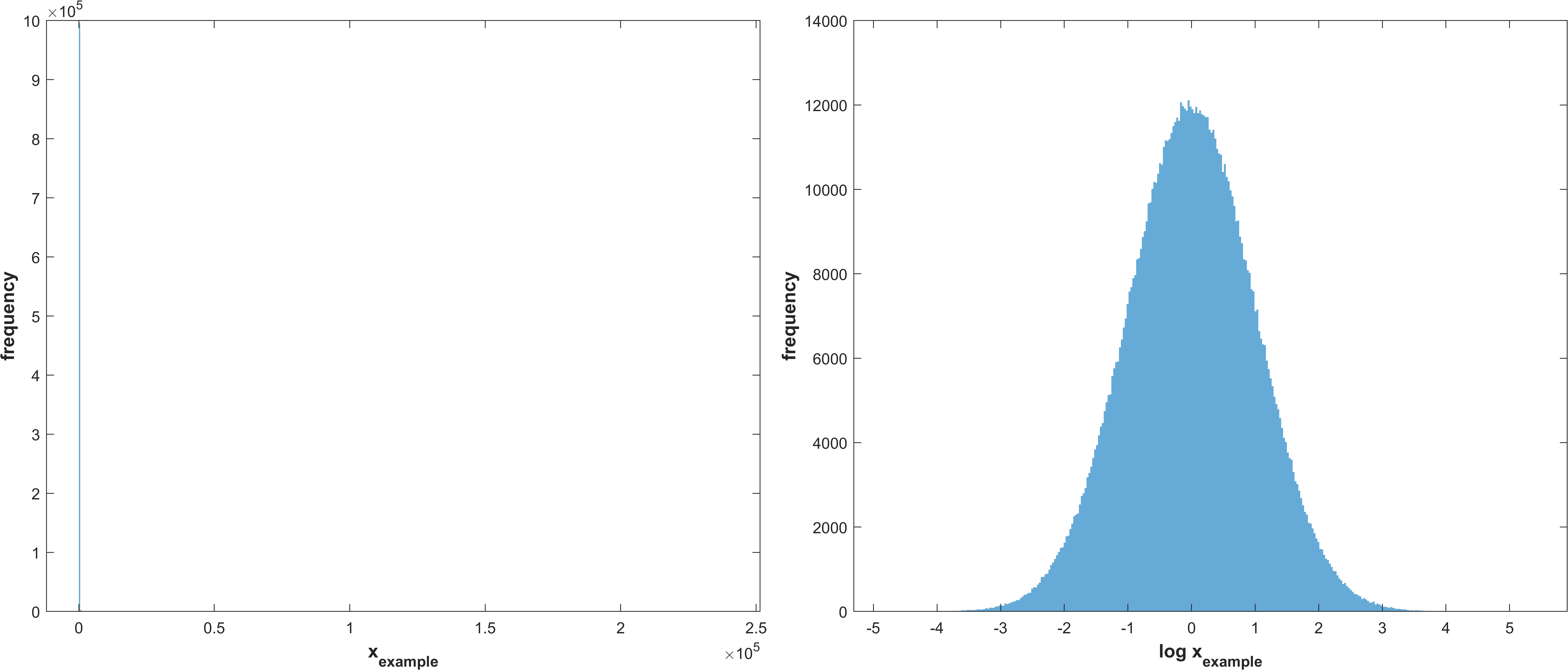
stg.sasamplemode - (double) Choose the way you want to obtain the samples of the parameters for performing the GSA;
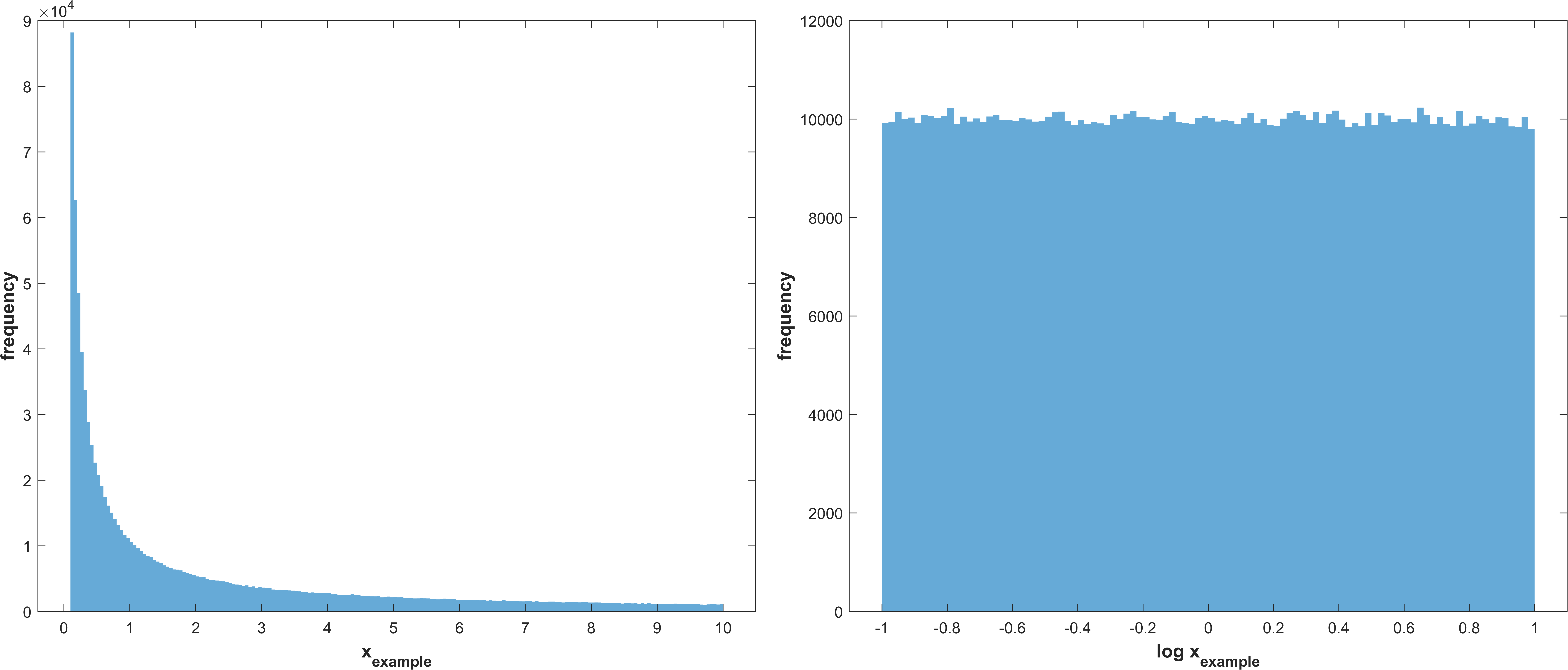
Reciprocal (log uniform) distribution
\(X_{i} \sim Reciprocal(a_{i},b_{i})\)
\(i =\) Parameter index
\(a_{i} = stg.lb_{i}\)
\(b_{i} = stg.ub_{i}\)
Example distribution with \(a = -1, b = 1\)
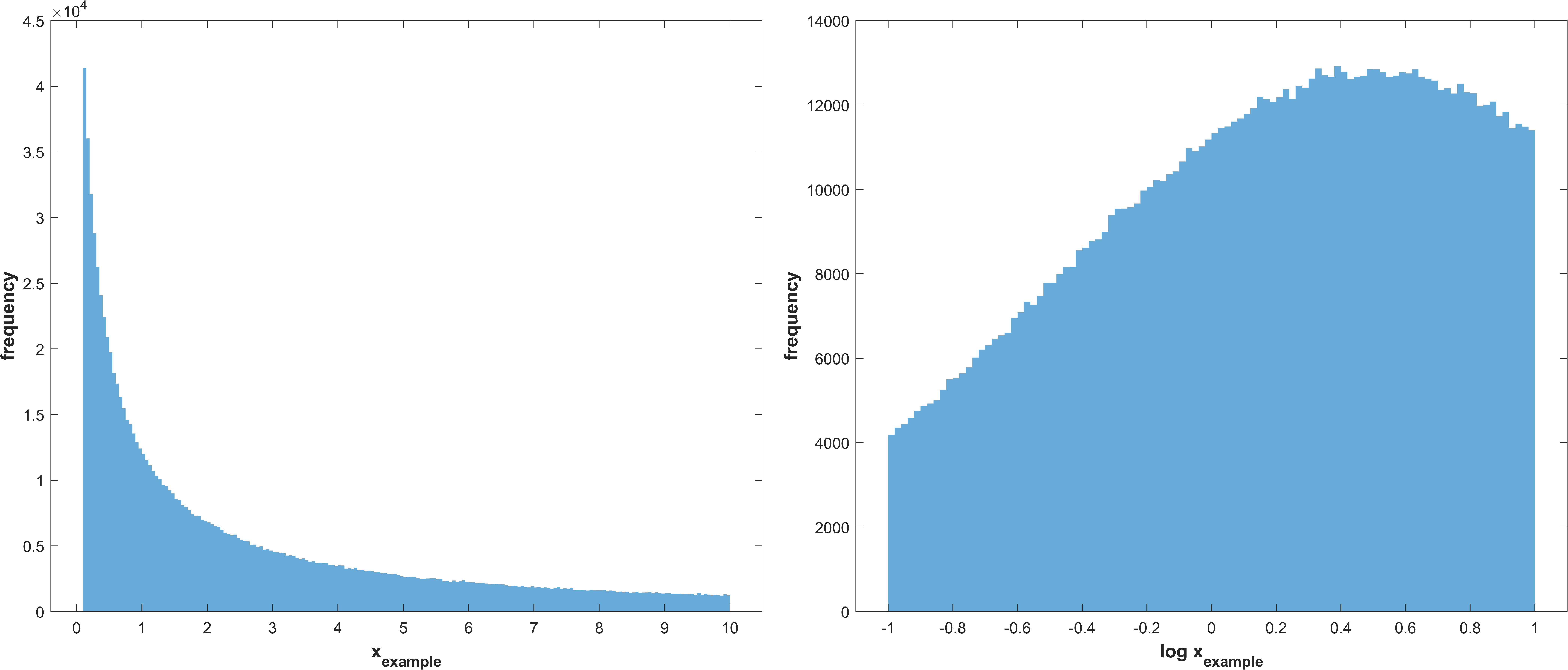
Log normal distribution with μ corresponding to the best value for a parameter, as recieved from the optimization, and σ as stg.sasamplesigma truncated at the parameter bounds
\(X_{i} \sim TruncatedLogNormal(μ_{i}, σ, a_{i}, b_{i})\)
\(i =\) Parameter index
\(μ_{i} = bestx_{i}\)
\(σ = stg.sasamplesigma\)
\(a_{i} = stg.lb_{i}\)
\(b_{i} = stg.ub_{i}\)
Example distribution with \(μ = 0.5, σ = 1, a = -1, b = 1\)
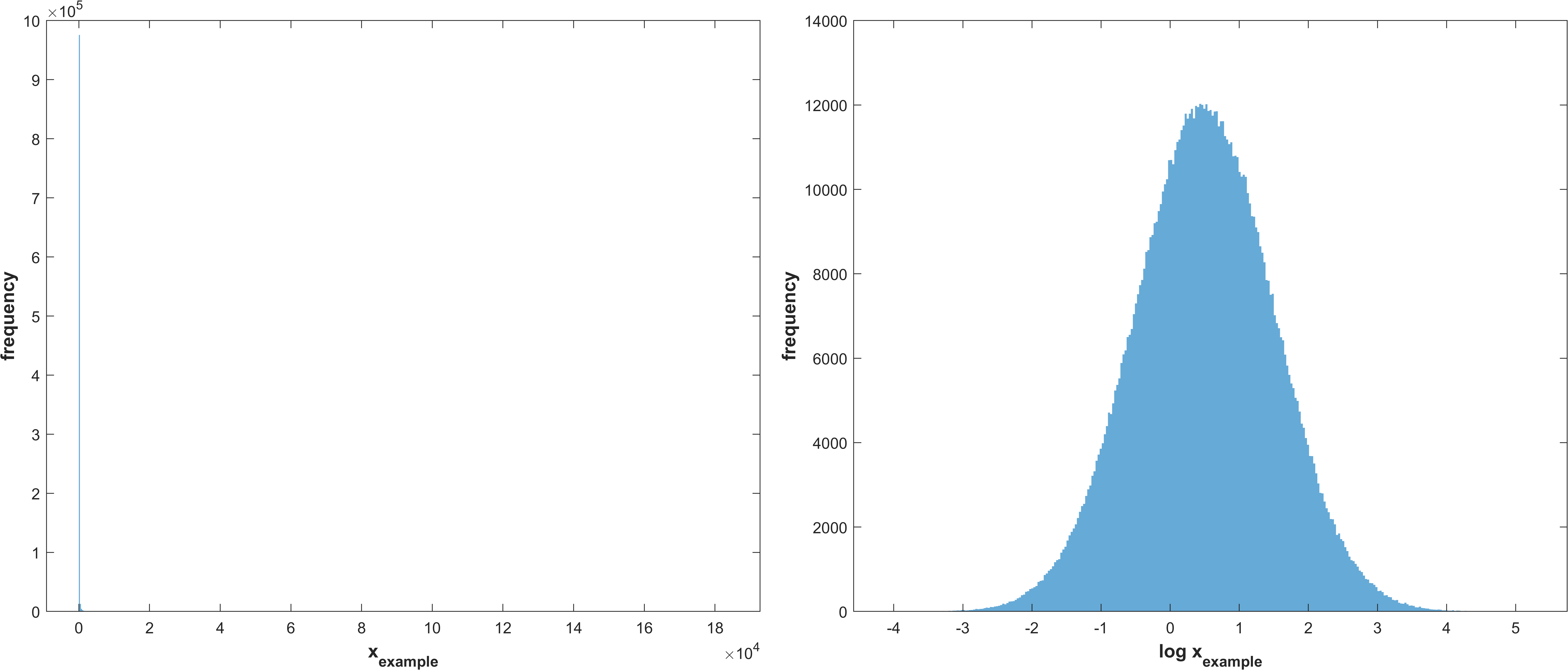
same as 1 without truncation
\(X_{i} \sim LogNormal(μ, σ)\)
\(i =\) Parameter index
\(μ_{i} = bestx_{i}\)
\(σ = stg.sasamplesigma\)
Example distribution with \(μ = 0.5, σ = 1\)
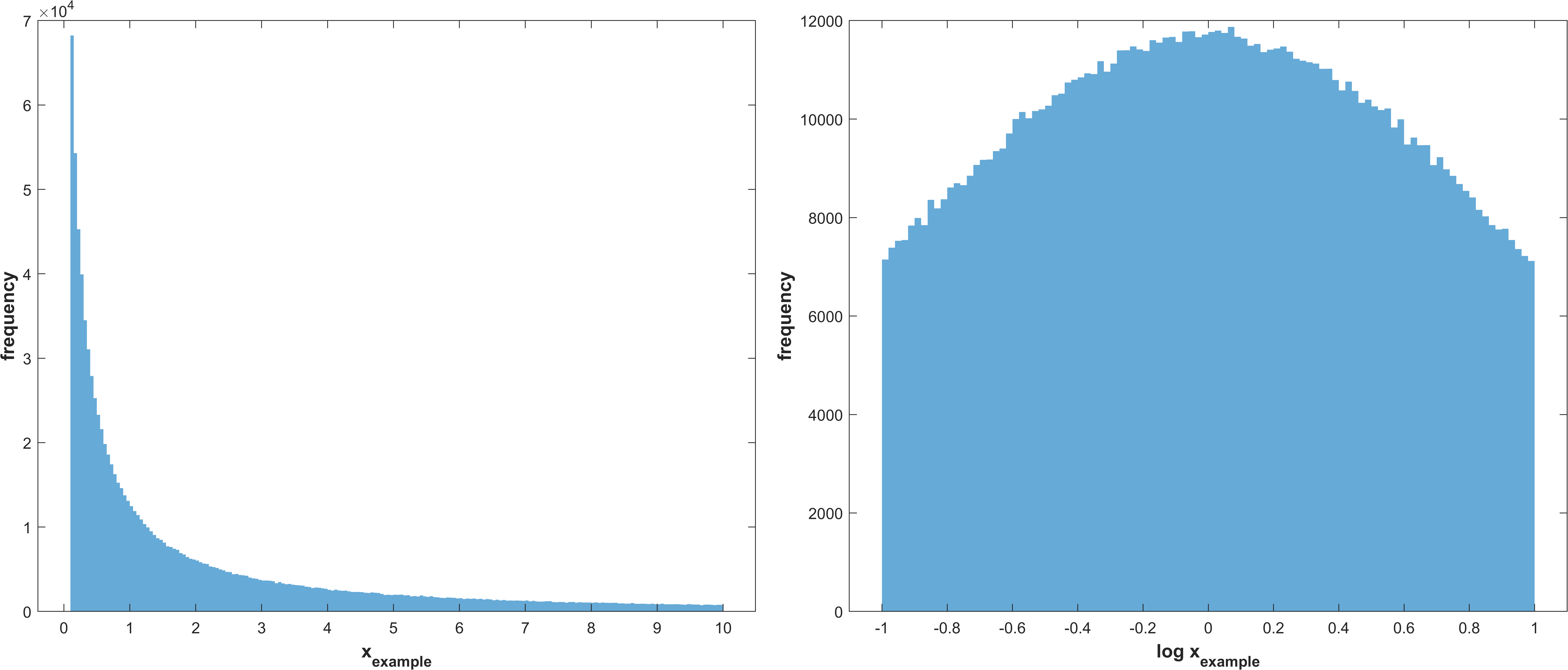
Log normal distribution with μ corresponding to the mean of the parameter bounds and σ as stg.sasamplesigma but truncated at the parameter bounds
\(X_{i} \sim TruncatedLogNormal(μ_{i}, σ, a_{i}, b_{i})\)
\(i =\) Parameter index
\(μ_{i} = \frac{stg.lb_{i} + (stg.ub_{i} - stg.lb_{i})}{2}\)
\(σ = stg.sasamplesigma\)
\(a_{i} = stg.lb_{i}\)
\(b_{i} = stg.ub_{i}\)
Example distribution with \(μ = \frac{a+(b-a)}{2}, σ = 1, a = -1, b = 1\)
same as 3 without truncation.
\(X_{i} \sim LogNormal(mu_{i}, σ)\)
\(i =\) Parameter index
\(μ_{i} = \frac{stg.lb_{i} + (stg.ub_{i} - stg.lb_{i})}{2}\)
\(σ = stg.sasamplesigma\)
Example distribution with \(μ = \frac{a+(b-a)}{2}, σ = 1, a = -1, b = 1\)
stg.sasamplesigma - (double) σ for creating the normal distribution of parameters to perform sensitivity analysis
Optimization
Default settings code
 1% Sets the time for the optimization in seconds (fmincon does not respect
 2% this time!!) (Optimization time)
 3stg.optt = 60*5;
 4
 5% Defines the population size for the algorithms that use populations
 6% (Population size)
 7stg.popsize = 144;
 8
 9% Chooses the optimization start method: 1 for random starting point(s)
10% inside bounds, 2 for random starting point(s) near the best point
11% (Optimization start method)
12stg.osm = 1;
13
14% Specifies the distance from the best parameter array to be used in
15% stg.osm method 2 (Distance from best parameter array)
16stg.dbpa = 0.1;
17
18% Specifies whether to use Multistart (Multistart)
19stg.mst = false;
20
21% Provides the Multistart size
22stg.msts = 1;
23
24% Specifies whether to display Plots (Plots don't work if using multistart)
25% (Optimization plots)
26stg.optplots = true;
27
28% Indicates whether to run fmincon (no gradient, so this doesn't work well;
29% no max time!!) (fmincon)
30stg.fmincon = false;
31
32% Sets options for fmincon (fmincon options)
33stg.fm_options = optimoptions('fmincon', 'Algorithm', 'interior-point',...
34    'MaxIterations', 10, 'OptimalityTolerance', 0, 'StepTolerance', 1e-6,...
35    'FiniteDifferenceType', 'central', 'MaxFunctionEvaluations', 10000);
36
37% Specifies whether to run simulated annealing (Simulated annealing)
38stg.sa = false;
39
40% Provides options for simulated annealing (Simulated annealing options)
41stg.sa_options = optimoptions(@simulannealbnd, 'MaxTime', stg.optt,...
42    'ReannealInterval', 40);
43
44% Specifies whether to run Pattern search (Pattern search)
45stg.psearch = false;
46
47% Sets options for Pattern search (Pattern search options)
48stg.psearch_options = optimoptions(@patternsearch, 'MaxTime', stg.optt,...
49    'UseParallel', stg.optmc, 'UseCompletePoll', true,...
50    'UseCompleteSearch', true, 'MaxMeshSize',2, ...
51    'MaxFunctionEvaluations', 2000);
52
53% Specifies whether to run Genetic algorithm (Genetic algorithm)
54stg.ga = false;
55
56% Options for Genetic algorithm (Genetic algorithm options)
57stg.ga_options = optimoptions(@ga, 'MaxGenerations', 200, ...
58    'MaxTime', stg.optt,'UseParallel', stg.optmc, ...
59    'PopulationSize', stg.popsize,'MutationFcn', 'mutationadaptfeasible', ...
60    'HybridFcn',{@patternsearch,stg.psearch_options});
61
62% Specifies whether to run Particle swarm (Particle swarm)
63stg.pswarm = false;
64
65% Sets options for Particle swarm (Particle swarm options)
66stg.pswarm_options = optimoptions('particleswarm', 'MaxTime', stg.optt,...
67    'UseParallel', stg.optmc, 'MaxIterations', 200, ...
68    'SwarmSize', stg.popsize);
69
70% Specifies whether to run Surrogate optimization (Surrogate optimization)
71stg.sopt = false;
72
73% Provides options for Surrogate optimization (Surrogate optimization
74% options)
75stg.sopt_options = optimoptions('surrogateopt', 'MaxTime', stg.optt,...
76    'UseVectorized', stg.optmc, 'MaxFunctionEvaluations', 5000,...
77    'MinSampleDistance', 0.2, 'MinSurrogatePoints', 32*2+1);
78end
Example settings code
stg.optt - (double) Time for the optimization in seconds (fmincon does not respect this time!!)
stg.popsize - (double) Population size (for the algorithms that use populations)
stg.osm - (double) optimization start method, choose between
Get a random starting parameter set or group of starting parameter sets inside the bounds
Get a random starting parameter set or group of starting parameter sets near the best parameter set
stg.dbpa - (double) Distance from best parameter set to be used in stg.osm method 2
stg.mst - (logical) Decide whether to use one or multiple starting parameter sets for the optimization
stg.msts - (double) Number of starting parameter sets for the optimizations
stg.optplots - (logical) Decide whether to display optimiazation plots (They aren’t ploted if running the code in multicore)
stg.fmincon - (logical) Decide whether to run fmincon (no gradient in our models so this doesn’t work very well, does not respect time set for the optimization!!)
stg.fm_options - (optim.options.Fmincon) Options for fmincon
stg.sa - (logical) Decide whether to run simulated annealing
stg.sa_options - (optim.options.SimulannealbndOptions) Options for simulated annealing
stg.psearch - (logical) Decide whether to run Pattern search
stg.psearch_options - (optim.options.PatternsearchOptions) Options for Pattern search
stg.ga - (logical) Decide whether to run Genetic algorithm
stg.ga_options - (optim.options.GaOptions) Options for Genetic algorithm
stg.pswarm - (logical) Decide whether to run Particle swarm
stg.pswarm_options - (optim.options.Particleswarm) Options for Particle swarm
stg.sopt - (logical) Decide whether to run Surrogate optimization
stg.sopt_options - (optim.options.Surrogateopt) Options for Surrogate optimization
Automatically generated at Import
stg.expn - (double) Total number of experiments stored in the SBtab
stg.outn - (double) Total number of experimental outputs specified in the SBtab